Portrait challenges
Record vertically and stay on one side of the court. Keep the whole service box with extra floor around it, the playing side wall and the red lines on the front wall visible.
Set up for one side
This example shows the right side. Apply the same checks on the left side when that is where your challenge is played.
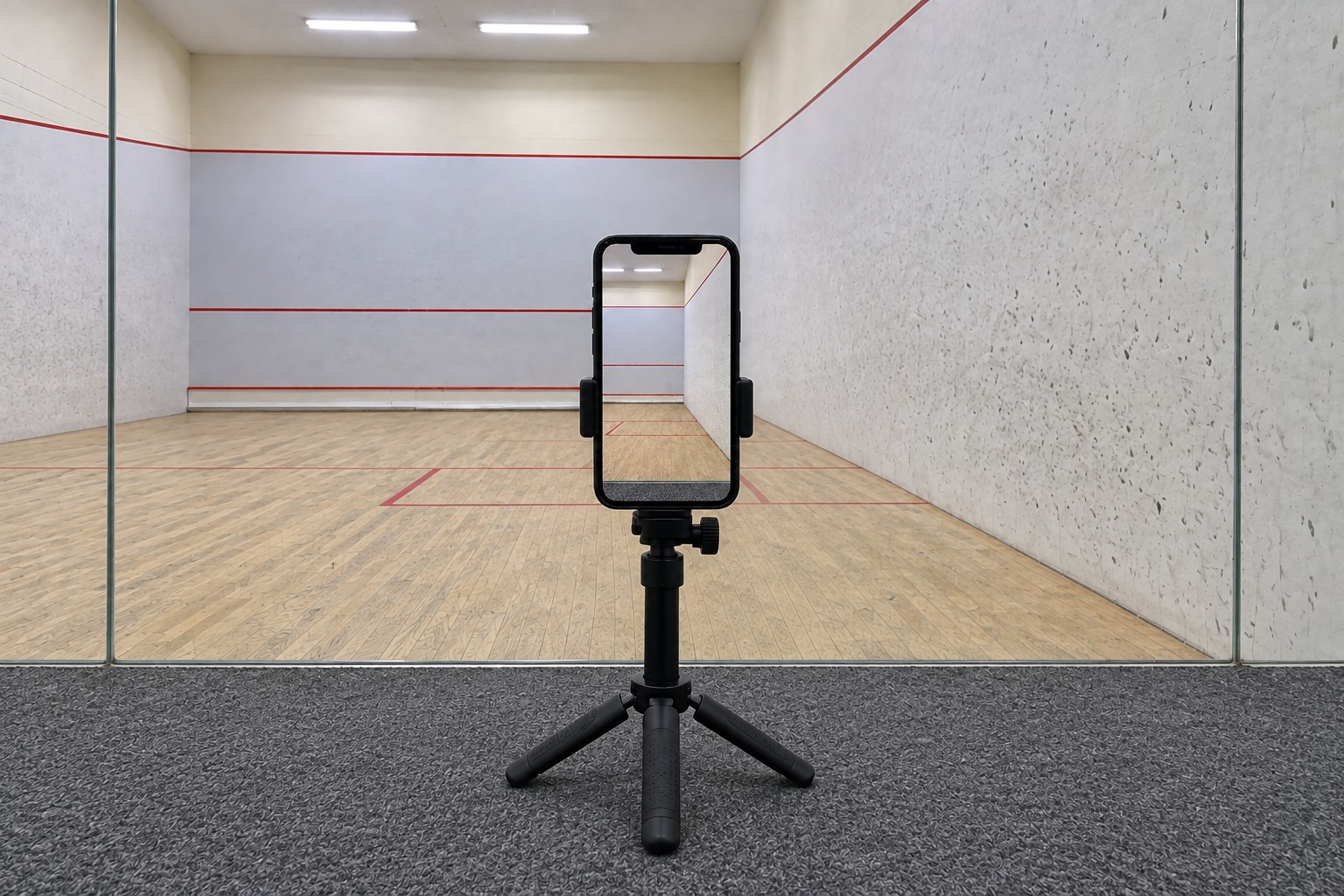
Face straight ahead from your playing side.
Place the tripod outside the rear glass, behind the half where you will play. Keep the phone around waist height and level, facing straight toward the front wall. Keep the door and walkway clear.
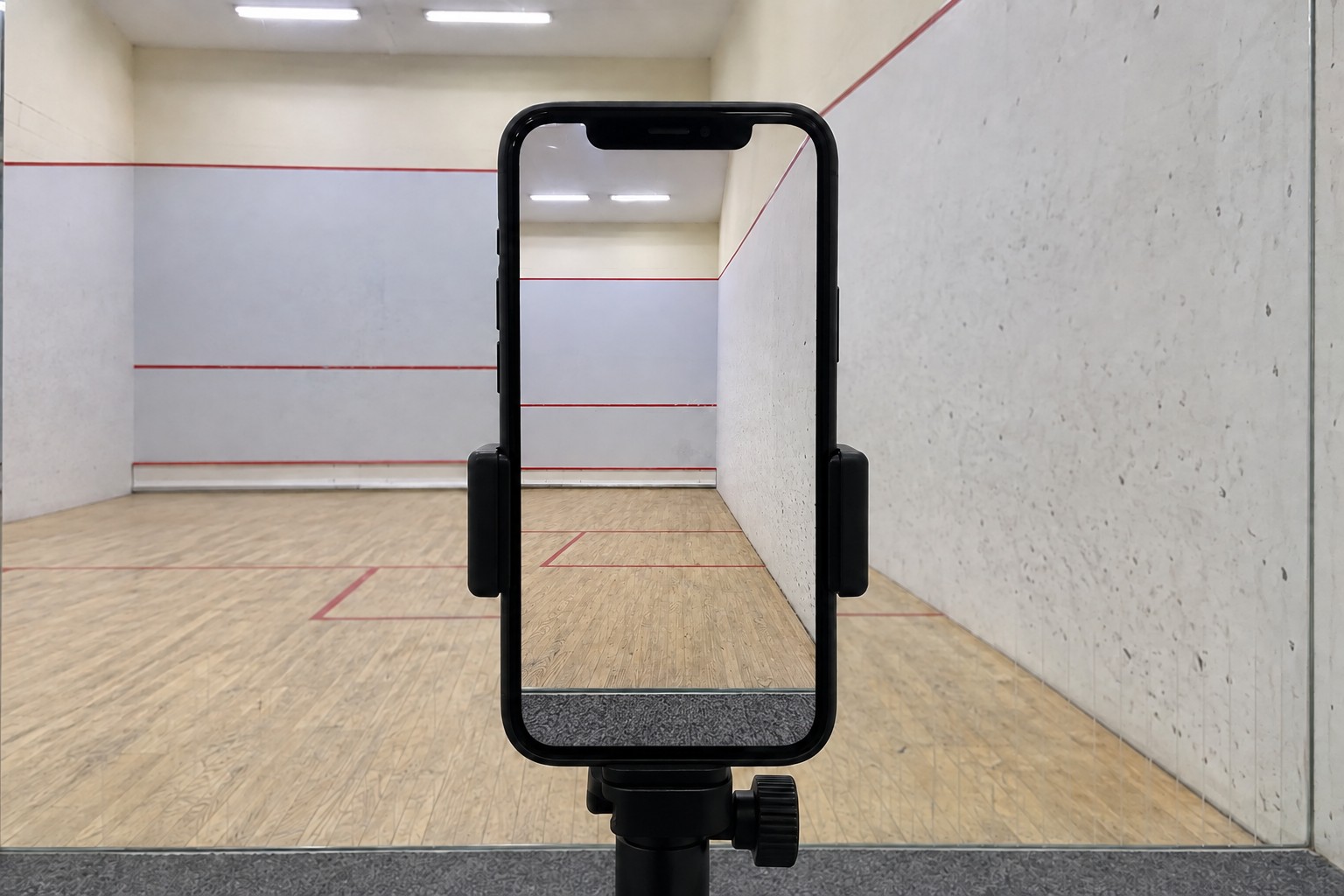
Level, at about waist height.
Face straight ahead from behind your playing half. Keep the phone upright and the lens level, rather than tilted down.
Keep the phone upright.
Clamp the phone vertically, with the rear lens uncovered. Tighten the mount and tripod head without tilting the camera down. Check the complete playing area in the preview.
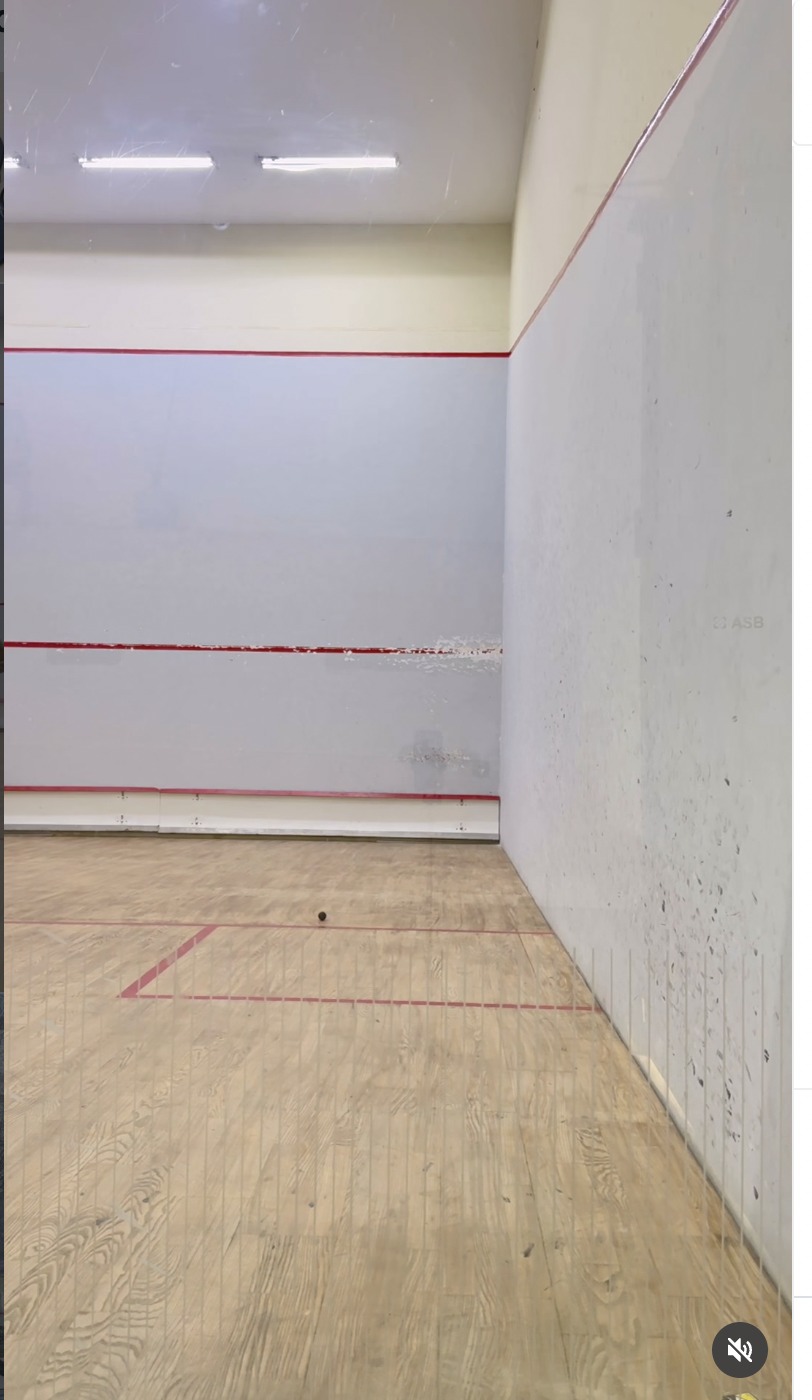
The whole service box, plus room around it.
Include every edge of the service box on your playing side. Leave extra floor around it so the frame is not tight to the box.
Do not crop tightly to the box.
The full service box and a little extra floor around it must be visible. Check this together with the wall and its lines before starting.
Keep the wall and its red lines visible.
Show the entire playing side wall. Keep the upper out line, service line and lower tin line visible on the front wall ahead.
Check the floor and wall together.
Avoid tilting down so far that the top red line disappears, or up so far that the service box is cropped. Keep both in the same fixed view.
One playing side. The full service box with extra floor. The playing wall and red lines. Keep these visible throughout your challenge, with the phone upright and fixed.
Orientation
Use portrait, with the phone upright, for these challenges played on one side. Keep the same orientation throughout. For a challenge using the full court, see the landscape guide.
Place the tripod
- Aim at your playing sideSet the tripod outside the rear glass, behind your playing half, with the phone around waist height. Face straight forward with the lens level. Keep the door and walkway clear.
- Check the service box and wall togetherAdjust the position and height until the whole service box, extra floor around it and the playing wall fit. Keep the front-wall red lines visible too.
- Keep the view clearCheck the preview for door handles, hinges, seams or reflections covering the box or wall markings.
- Lock the setupSecure all three legs, the vertical phone clamp and the tripod head. Recheck the frame after tightening.
Check your playing area
Include the entire service box on your side, with a little extra floor around it. Do not crop the picture to the box’s edges.
Keep the whole playing side wall in view, including its upper red boundary. On the front wall ahead, keep the upper out line, service line and lower tin line visible.
Play and stay on the side used for the challenge. Keep the camera fixed on that area throughout the recording.
Keep both floor corners on your playing side visible. In particular, include the rear corner where the side wall meets the glass, with some margin. Do not crop the floor strip beside the wall before it reaches that corner.
Before you record
A final look at the screen
- The phone is upright, in portrait.
- The whole service box and extra floor around it are visible.
- The playing side wall and the front-wall red lines are visible.
- The front and rear corners on that side are included.
- The camera is fixed and you stay on the side used for the challenge.
Record and submit your own challenge
One account belongs to one competitor. Record and submit only your own challenge videos using your own account. Do not share accounts or submit another person’s video.
Questions
Are all squash challenges recorded in landscape?
No. Squash has portrait and landscape challenges. This guide covers portrait challenges played on one side. Use the landscape guide for the full court format.
Can the portrait challenge be played on either side?
The setup can cover the left or right side, depending on where your challenge is played. This guide shows the right side. Keep the corresponding service box, playing wall, front-wall red lines and two corners visible on the left.
How much floor should be visible?
Show the whole service box on your playing side, plus a little extra floor around it. Leave room beyond the box’s edges while keeping the wall and its red lines in view.
Do I need three corners for portrait?
For this portrait setup, include two: the front and rear floor corners on your playing side. Prioritise the full service box, surrounding floor and wall visibility, then check those corners.
Should I move the camera to follow play?
Keep the phone fixed and upright. The challenge is played on one side, and that same area should stay in the picture throughout.
Can I share a tripod with another competitor?
Yes, you can share the tripod. Each person must use their own account to record and submit only their own challenge videos. One account belongs to one competitor and must not be shared. Recheck the framing before recording your own challenge.
Send us the frame
Send a screenshot of your camera preview to support@futureofsports.io so we can help check the playing area.