Framing and lane alignment
Keep your playing lane centred, your full approach in frame, and the camera’s view of the pins clear when the ball hits.
See the whole setup
Start with the tripod, then check what the phone actually sees.
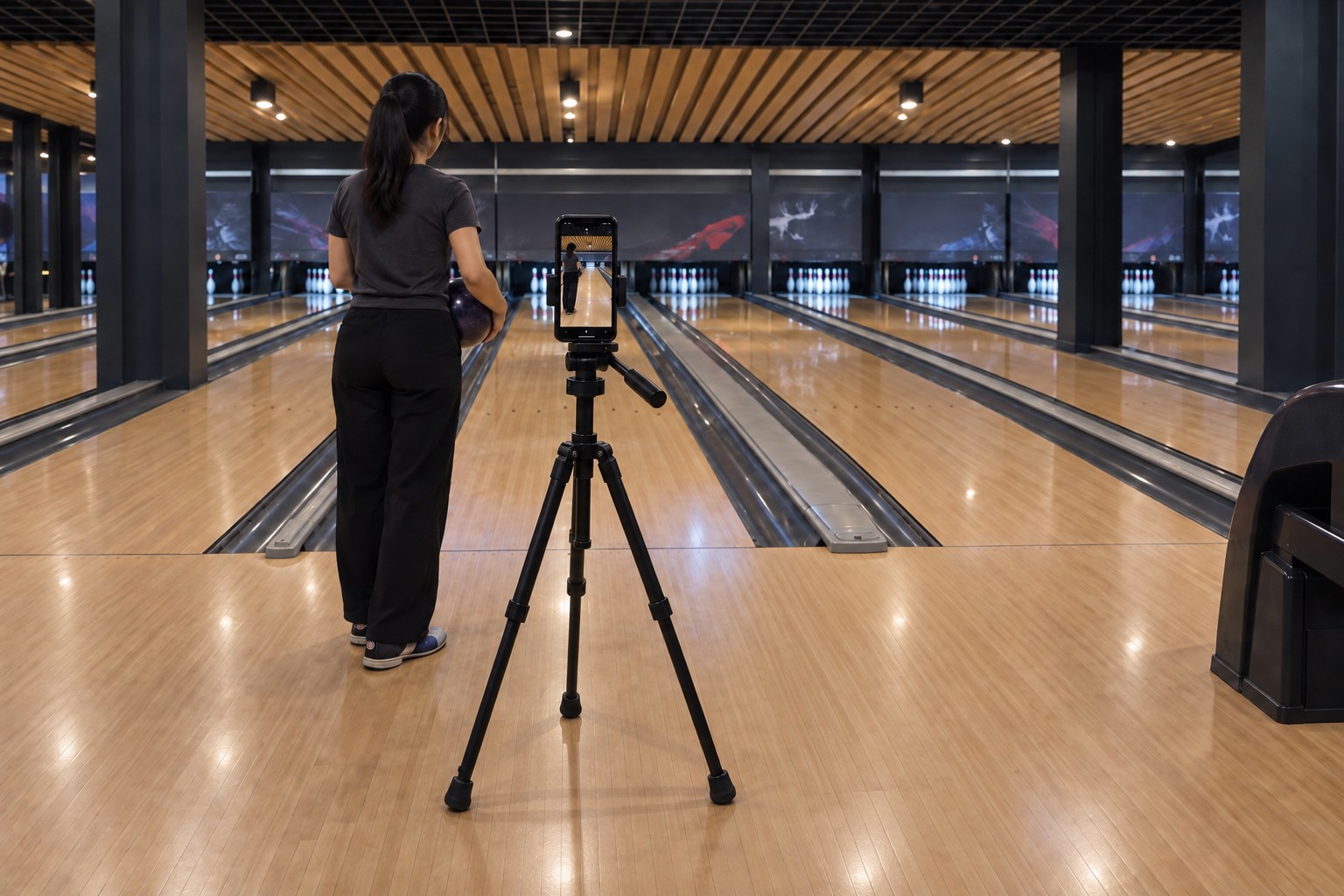
Behind your approach. In line with your lane.
Align the tripod with the middle of your playing lane, behind where you start your approach. Keep all three legs behind your steps and clear of neighbouring approaches. The phone should look straight down the same lane shown in the next steps.
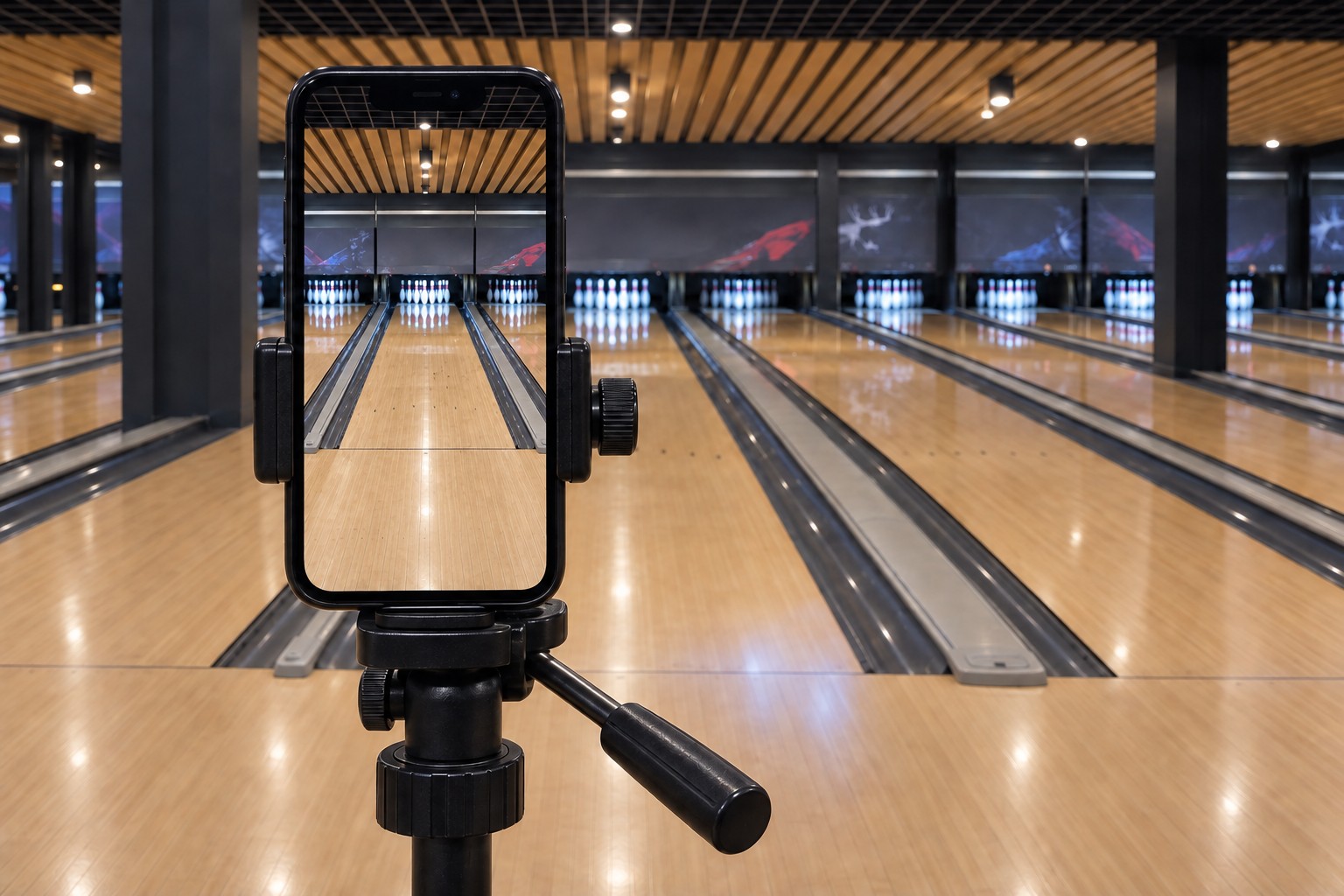
Clamp it in portrait. Aim at your lane.
Keep the rear lens uncovered, level the phone, and tighten the tripod head. Step aside to check the screen: your lane and its pins should be centred. Then step back into position for the approach check.
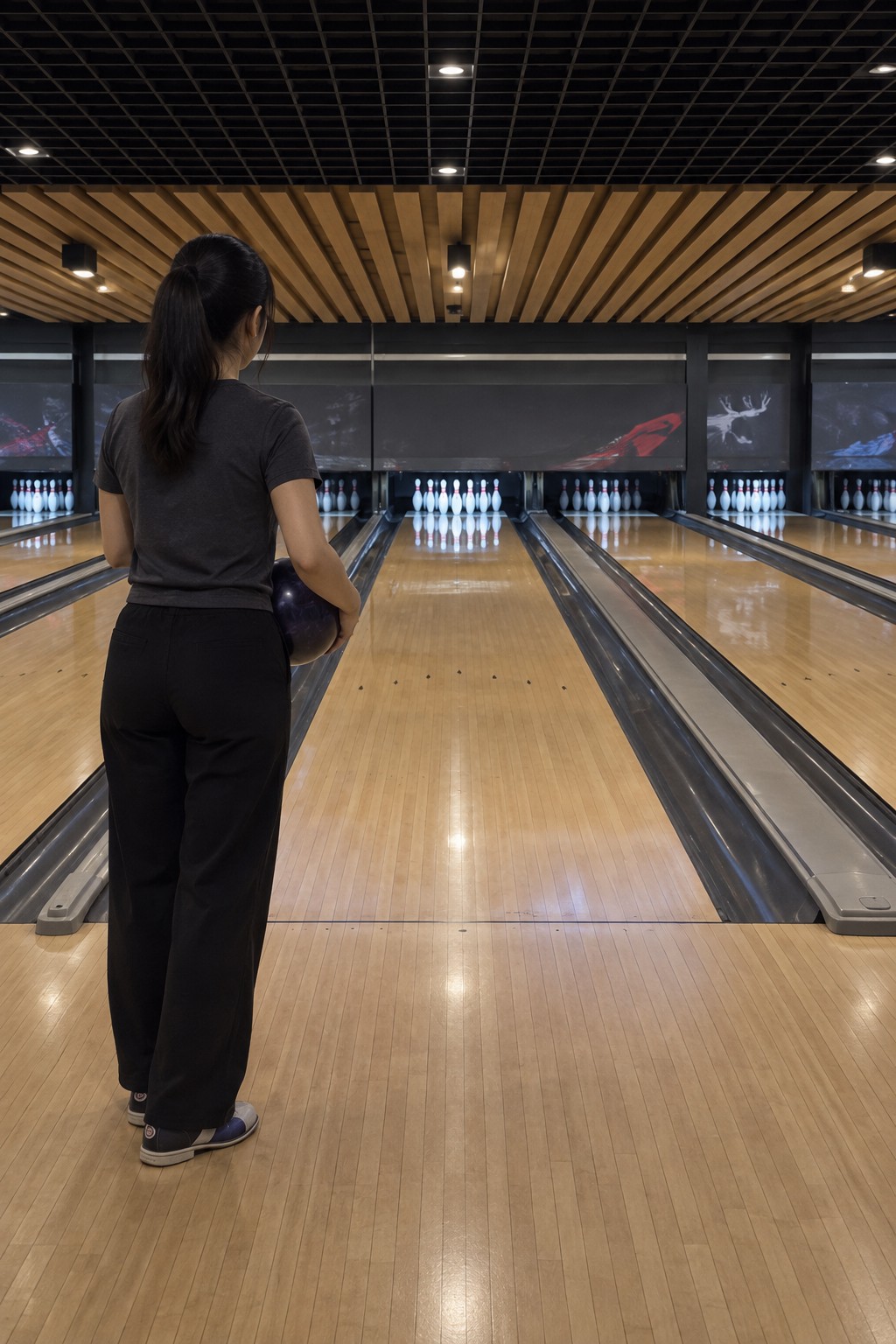
This is your playing lane.
Keep it centred, with both gutters visible from the foul line to the pins.
Centre the lane. Keep the pin deck clear.
The outline follows your playing lane, from the foul line to its pins. Keep this same view through the delivery: the camera must see the pins when the ball hits them.
Stay clear through impact.
Check a practice delivery all the way from release until the pins finish falling.
Your full approach. A clear view at impact.
Keep your body and shoes in frame during the approach and release. Finish your follow-through safely, then move clear of the camera-to-pins sight line on your own approach if needed. Stay clear while the ball reaches the pins and they finish falling.
Your playing lane belongs in the centre of the phone’s picture. Place the tripod behind your starting position, aligned with the middle of that lane. Check that the phone sees your approach, both lane edges and the pins.
If your body blocks the camera’s view of the pins when the ball hits, the shot cannot be scored. Keep the ball’s path and pin deck visible after release, through impact and until the pins finish falling. A clear view before you bowl is not enough.
Orientation
Record bowling vertically, in portrait. Mount the phone upright before you start and keep it that way for the entire recording.
Place and secure the tripod
The right position depends on your approach and the space at the centre. Use the live preview to make the final adjustment.
- Start behind your approach, in line with your laneAlign the tripod with the middle of your playing lane, behind where you begin your steps. Use a stable position the centre permits. All three legs must stay behind your starting position, clear of your walking and swing path, neighbouring approaches and shared walkways.
- Bring it forward if the pins look tinyA camera far back in the seating area wastes the frame on empty floor. Move closer to the back of your starting position, then check that your full body and first step still fit. Keep the tripod off the lane surface.
- Spread the legs and lock themPlant all three feet on level floor. Open the legs fully within the available space, lock each leg section, and check that the tripod does not rock.
- Adjust the height for a clear viewUse the preview to adjust the phone’s height until the lane and pin deck are clear while your shoes and approach stay in the frame. Check that your body does not block the pins when the ball reaches them.
- Mount the phone verticallySecure it in the clamp with the rear camera facing the pins. Keep the lens uncovered. Level the picture, tighten the head and tilt controls, then check the framing once more.
A centred empty lane is only the first check. Make a practice delivery and review your recording. Confirm that your body is clear of the pin deck when the ball arrives. If the view is blocked, adjust the camera height or where you stand after release, then test again.
Check the camera preview
Follow one lane from your feet to its pins. The lane beside it can appear in the picture, but your playing lane should be unmistakable.
Keep the middle of your playing lane near the middle of the portrait preview. Its left and right edges should lead towards the same pin deck.
Include the full width of the foul line and both gutters all the way to the far end. Avoid clipping one side or accidentally following the neighbouring lane.
Keep the whole pin deck in view, with clearly recognisable pins and a little room above them. The rack should not disappear into darkness, blur or a patch of glare. Pins naturally overlap from this viewpoint; the goal is a clear view of the rack and what happens when the ball arrives.
Include your whole body, bowling arm and shoes from the start of your approach through the slide and release. Keep some space around them so a normal step or follow-through is not cropped.
The camera must see the ball reach the pins and the pins fall. If your body blocks the pin deck at impact, the shot cannot be scored. Check the entire delivery for obstructions from your body, a ball return, a column or passing people.
First clean the lens and check the lighting. If the pins are still too small, move the tripod a little closer while preserving your starting position in shot. Do not zoom into the pins and crop out the rest of the lane.
After you release the ball
- Finish your follow-through safelyStay balanced on your own approach. Keep your body out of the camera’s sight line to the pins; move clear after release if needed.
- Leave the view clear through impactDo not stand in front of the pin deck from the phone’s viewpoint, walk back towards the phone or let someone cross the shot while the ball is travelling. Keep the view clear until the pins finish falling.
- Check this before the scored sessionReview a practice delivery through the moment the ball hits the pins. If you cannot keep the view clear safely, adjust the setup and test again before recording your session.
Fix your framing
Make one adjustment, then repeat the full preview check.
The wrong lane is in the middle
Trace both gutters from your foul line to your pin deck. Turn the phone towards that lane until it is centred.
The pins are too small
Move forward from the seating area towards the back of your approach. Stop before you lose your starting position or obstruct play.
Your shoes or swing are cropped
Give the approach more room. Adjust the tilt or move back slightly, then recheck the pin deck and both gutters.
Your body hides the pins at impact
That shot cannot be scored. Keep the tripod aligned with your lane, check its height, and move clear of the sight line after your follow-through. Test a delivery through impact before starting again.
The rack is dark or washed out
Clean the lens and use well-lit conditions. Check the pins themselves; a bright overhead score monitor does not show whether the pin deck is clear.
The picture moves
Check the clamp, head and leg locks. Place all three feet firmly, start the recording, and leave the phone alone.
Before you record
A final look at the screen
- Your playing lane is centred, with both gutters and the full foul line visible.
- The whole pin deck stays visible through impact and until the pins finish falling. Your body does not block it.
- Your entire approach, including your shoes and release, stays in the frame.
- The tripod is stable and clear of everyone’s path.
Record and submit your own challenge
One account belongs to one competitor. Record and submit only your own challenge videos using your own account. Do not share accounts or submit another person’s video.
Keep one continuous recording
Set the frame before you begin, then keep the camera fixed for the session. Do not pan after the ball, re-aim towards the score monitor or cut between deliveries.
Check the light where it matters
Normal house lighting is the easiest starting point. Whatever the room lighting, you need to see the ball, lane edges and pins clearly throughout the recording. If the pins disappear in darkness or glare, improve the view before starting.
Questions
Should the tripod be centred or off to one side?
Use the centred setup shown here: tripod behind your starting position and aligned with the middle of your playing lane. Keep that same lane centred in the phone’s preview. Check the camera height and your position after release so your body does not block the pin deck when the ball arrives.
What if I block the pins after releasing the ball?
If your body blocks the camera’s view of the pins when the ball hits, the shot cannot be scored. Finish your follow-through safely, then move clear of the sight line on your own approach if needed. Keep the ball’s path and pin deck visible through impact and until the pins finish falling. Check this with a practice delivery before the scored session.
How far back should the tripod be?
Start near the back of your approach, behind your first step. Move closer if the pins look tiny, but keep your full body and approach in shot. The final position depends on the available space, your steps and what the centre allows.
Do I need to see ten separate pin silhouettes?
No. Pins naturally overlap when viewed from behind the lane. Keep the whole rack and pin deck visible, with enough detail to recognise the standing pins and see the result of the ball reaching them.
Portrait or landscape?
Record bowling vertically, in portrait. Keep the approach at the bottom, your lane centred and the pins towards the top. Set the phone upright before you start and do not rotate it during the recording.
Can I share a tripod with another competitor?
Yes, you can share the tripod. Each person must use their own account to record and submit only their own challenge videos. One account belongs to one competitor and must not be shared. Recheck the framing for your own height, starting position and approach before you record.
I bowl two-handed. Does the framing change?
The same checks apply: keep your full body, both shoes, the release, the lane and the pin deck visible. Leave enough space for your own movement rather than copying someone else’s starting position.
What about string pins or bumpers?
Keep the same clear view of the lane and pin deck. Check your challenge’s rules for supported play conditions before recording.
Should I include the centre’s score monitor?
Prioritise the physical lane and pins. Do not tilt the phone away from the approach or pin deck just to include the overhead score display.
Can someone hold the phone for me?
Use a fixed tripod for the session. Even small handheld movements change the framing, so set the phone securely before you begin.
Can I record in coloured lighting?
Check the actual preview. The pins, ball and lane edges need to remain clearly visible. Normal house lighting is easier to work with; if coloured lighting or glare hides the detail, use better-lit conditions.
My session came back without a score. What should I check?
Review the recording for cropped feet, a missing lane edge, an obscured pin deck, camera movement or someone crossing the shot. Confirm that the recording follows your challenge’s instructions. Framing is one thing to check; the result alone does not identify the cause.
Where can I read about video processing?
See the AI and Data Processing Notice.
Send us the frame
A screenshot of your camera preview helps us check the setup. Send it to support@futureofsports.io with the lane and the centre.